
 Pano: digital signage and digital menu board management
All your screens in one panel; playback continues even if the internet drops.
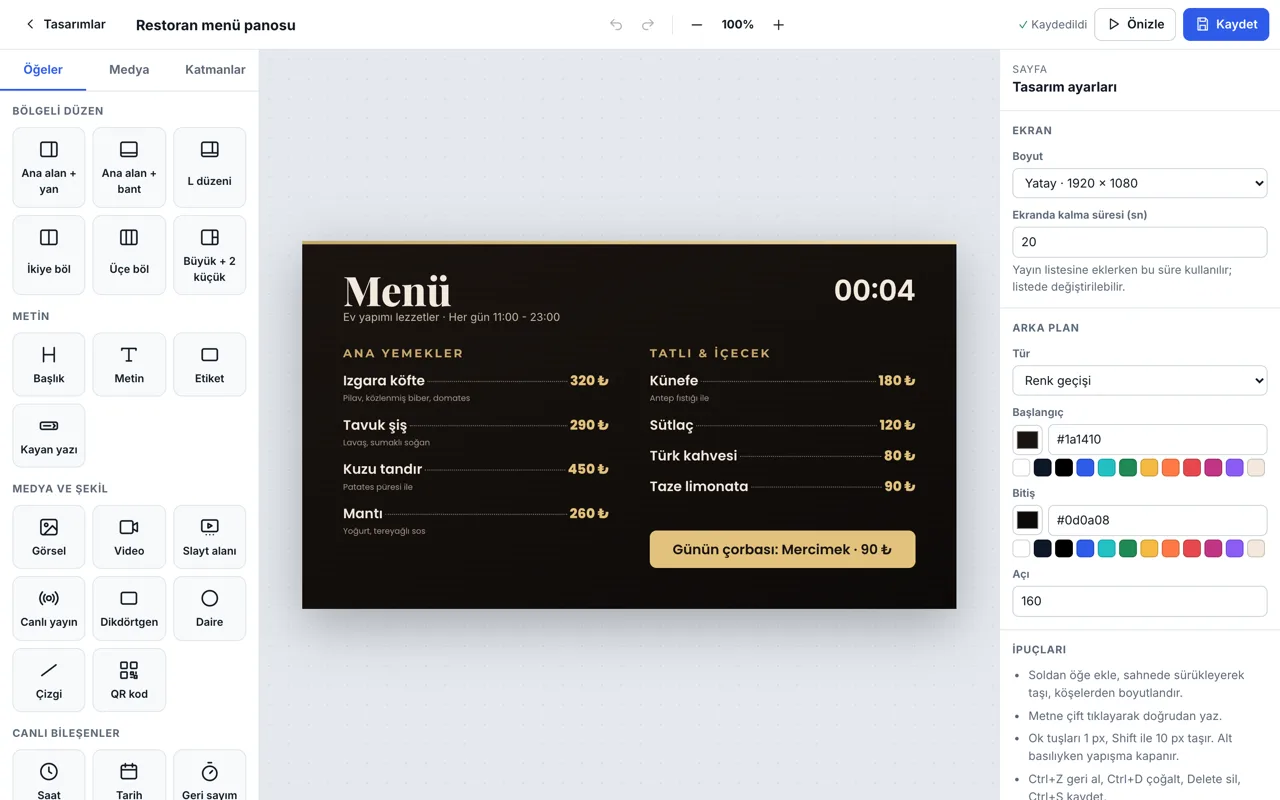
Manage the TVs in your shops, restaurants, offices and waiting rooms from one panel. Create menu boards, campaigns and announcements with the drag-and-drop design studio and ready-made templates; give each screen its own playlist and schedule.
What it
does
Everything you do every day with Pano, in one place.
Design studio
Drag-and-drop editor: text, images, video, QR, clock, countdown, scrolling text; undo, layers, autosave.
Ready-made templates
Restaurant menu board, campaign, corporate welcome, salon price list, exchange rates, prayer times, duty pharmacy and more.
Live widgets
Weather, exchange rates, prayer times, time and date update on screen by themselves.
Schedule
A separate playlist for each screen; duration, days and time range per item. Changes reach all screens with ‘Publish’.
Works on any TV
Smart TV browser, Android TV box, iPad or mini PC; connects in minutes with the 6-digit code on the screen.
Plays offline
Content is cached on the screen; playback continues if the connection drops, and the panel shows each screen's online status.
How it
works
Get started in three steps; we're with you throughout setup.
- 1
Connect the screen
Open the player on the TV and enter the code shown into the panel.
- 2
Prepare the content
Upload a video or create your design from a ready-made template.
- 3
Publish
Assign the playlist to the screen; changes appear on screen within seconds.
Common
questions
The most common questions about Pano. For anything else, see all questions.
How much does Pano cost?
Pricing is per screen per month: Basic ₺249, Pro ₺399, Enterprise ₺599 (excl. VAT). Pay yearly and get 2 months free; there is no setup fee.
Which devices does it run on?
A smart TV browser, an Android TV box, an iPad or a mini PC. Just open the player and enter the 6-digit code shown on the screen into the panel.
Does playback stop if the internet goes down?
No. Content is cached on the screen, so playback continues even if the connection drops; new changes are picked up when it's back.
Are there ready-made templates and menu boards?
Yes. The Pro and Enterprise plans include the design studio, ready-made templates such as restaurant menu boards, campaigns, announcements, exchange rates and prayer times, and live widgets.